Pixel Blade Full Release Guide: Combat, Quests, and Progression Tips
Master the Pixel Blade full release update on Roblox. Get expert insights on the new combat mechanics, revamped quest system, class progression, and essential gameplay strategies.
Published: Pixel Blade Wiki Editorial Team
Table of Contents
The Pixel Blade Full Release Update
The official release of Pixel Blade on Roblox marks a significant turning point for the game. This update brings a massive overhaul to almost every core system, including combat flow, quest management, and item enchantment. Whether you are a veteran player returning to see the changes or a newcomer jumping in for the first time, understanding these mechanics is essential for efficient progression.
This guide breaks down the major shifts observed in the latest release, offering practical advice on how to navigate the new UI, optimize your character build, and avoid common pitfalls reported by the community.
Combat Mechanics and Elemental Scaling
The combat in Pixel Blade has undergone a mechanical shift, moving away from simple spam-clicking toward a more tactical approach. One of the most immediate changes is the ability to hold the M1 button to attack, streamlining the user experience during farming and boss encounters.
The New Parry System
Parrying is no longer just a defensive maneuver; it is now a core offensive tool. When you successfully time a parry against incoming projectiles, the attack is reflected back toward the enemy. Crucially, this action now applies a "vulnerable" status effect to the target, making them take increased damage.
Tip
Mastering Parries: Focus on timing your parry just as the projectile is about to hit. The vulnerability debuff is a massive damage multiplier, especially against bosses or elite enemies. Practice this in early worlds to build muscle memory.
Elemental Damage and Scaling
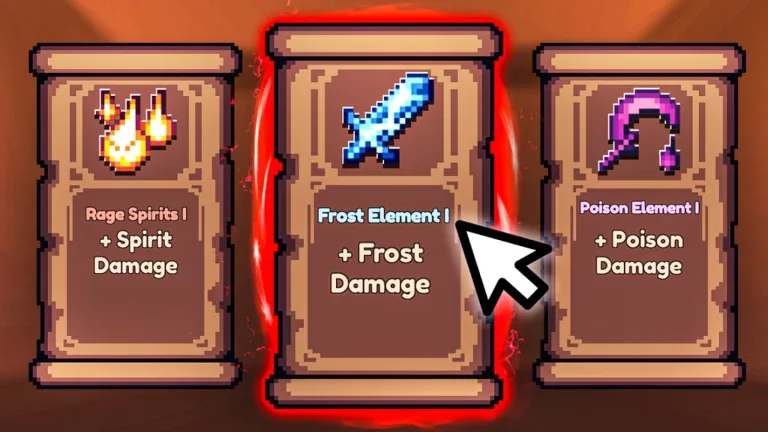
Elemental effects have been reworked to function on a stack-based system. Instead of flat damage, your attacks now have a chance to apply elemental stacks. The more stacks you apply, the more effectively you can trigger secondary effects:
Fire: Deals significant burst damage.
Frost: Slows enemies down significantly upon reaching high stack counts.
Poison: Applies sustained damage over time.
Community reports suggest that scaling has changed significantly across the board. High-tier weapons from later worlds now deal thousands of damage per hit, making it vital to prioritize gear progression. If you find yourself struggling, consider returning to previous worlds to farm better gear, as the scaling makes low-level content much easier once you have upgraded equipment.
Navigating the New Quest System
The quest system has been completely overhauled to feel more like an RPG experience. You are no longer limited to a small handful of tasks; the system now supports a vast number of active quests, which can be tracked and managed through various NPCs scattered around the lobby.
How to Optimize Questing:
Interact with NPCs: The lobby is now filled with NPCs. Walk up to them to accept quests rather than relying solely on a menu.
Manage Your Log: You can now take on a large number of quests simultaneously. Do not be afraid to accept multiple tasks at once.
The Loop: Many quests require you to talk to specific characters or defeat bosses in specific worlds. If you get stuck, check your quest log to see if you have missed an NPC conversation.
Return to Lobby: Note that for many quest chains, you cannot chain runs indefinitely. You will need to return to the lobby to queue for the next mission.
While the sheer volume of quests provides excellent rewards, including wishes for events, the process can be repetitive. Community feedback indicates that while these quests are designed for new players, the rewards are valuable enough for everyone to complete.
Enchanting and Armory Upgrades
The enchantment system has moved away from the traditional librarian interaction. You now collect pages and unveil books independently, which allows for more control over your gear customization.
Custom Art and Merging
Every book now features custom art, making it easier to identify your enchants at a glance. You can merge books directly within the enchantment menu, removing the need to travel to specific NPCs. This change makes it much faster to optimize your gear on the fly.
Weapon Upgrades
According to player experience, the cost to upgrade weapons has been adjusted. Currently, it requires fewer copies of a weapon to upgrade it, which is a massive boon for progression.
Warning
Upgrade Now: Because the upgrade costs are currently low, it is highly recommended to upgrade all your primary weapons as soon as you have the gold. There is no guarantee this cost-effective scaling will remain in future patches, so take advantage of it while you can.
Classes and Strategic Progression
Classes play a massive role in your effectiveness. The Necromancer class, for instance, is currently noted for being highly polished. However, the game allows for rolling classes, which introduces an element of chance.
Tips for Class Management
Don't Rush Rerolls: If you roll a class that is Epic or higher, hold onto it. With the current system, there is no "class saving" feature, meaning if you reroll, you lose your current class regardless of its rarity.
Team Composition: In multiplayer, your summoned units (like those from the Necromancer class) can now teleport with you, making team-based play smoother.
Avoid Agility 2: A notable piece of community advice is to avoid upgrading Agility to level 2. Reports suggest that the attack speed benefits cap out at level 1, making the second level an inefficient use of your resources.
FAQ: Common Player Questions
Why is there a "vaulted" charm?
Community reports suggest that there is a specific quest-related charm that is unique. If you obtain an epic charm from a quest, be careful not to use it or discard it, as these may not be obtainable through standard fishing methods.
Can I reset a run to farm bosses faster?
In the current version, the "reset" strategy has been patched. You must now manually leave the run via the menu and return to the lobby to queue again.
Why is the screen blocked when I press Tab?
This is a known UI issue in the current build where the menu takes up a large portion of the screen. Players are advised to manage their inventory and quests before entering a run to minimize the need to open the menu during gameplay.
Are there new codes?
As of the latest update, there are no new codes released. Developers are currently monitoring the game for bugs and stability issues before releasing promotional codes. Always check the official game page for verified updates.
The Pixel Blade full release is a complex update that rewards players who take the time to learn the new systems. By focusing on smart enchanting, avoiding inefficient upgrades like Agility 2, and mastering the new parry mechanics, you can significantly improve your performance in the game's challenging boss encounters.